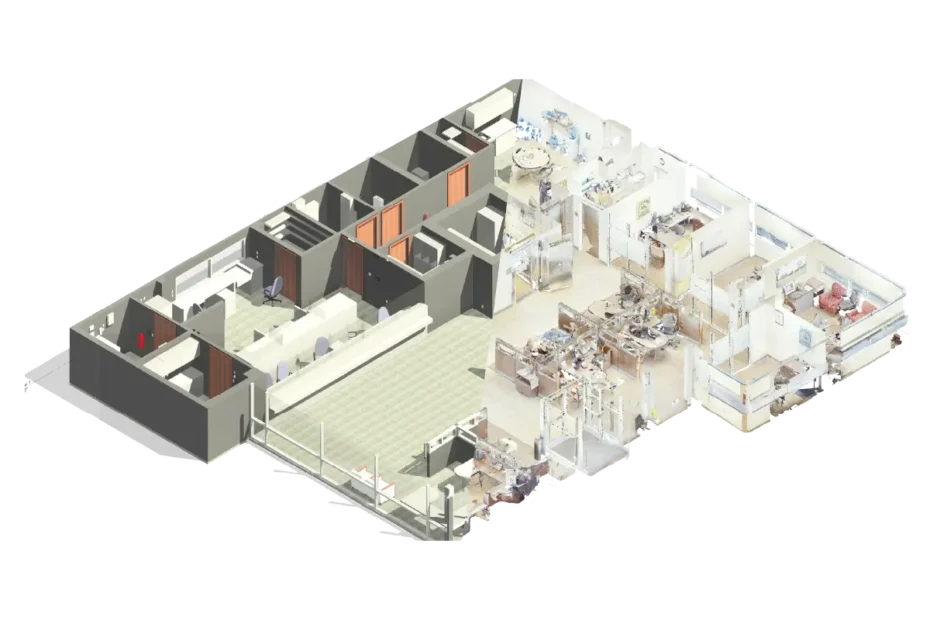
Scan to BIM process has become one of the most reliable methods for capturing existing building conditions with precision and efficiency. Instead of relying on outdated drawings, manual measurements or assumptions, Scan-to-BIM uses advanced laser scanning technology to create accurate digital representations of the built environment. As a result, these as-built conditions transform into intelligent Revit models that support design, renovation, refurbishment, coordination and facilities management.
Furthermore, as the demand for Scan to BIM services UK continues to rise, more architects, contractors and property owners are turning to this process to reduce risks, prevent costly rework and make better project decisions. Therefore, whether you’re planning a refurbishment, extension or long-term asset documentation, understanding how the Scan-to-BIM process works will help you approach your project with more confidence.
Capturing Existing Conditions With Laser Scanning
Every successful Scan to BIM process starts with capturing detailed on-site conditions using high-resolution laser scanners. These scanners emit millions of laser points per second, collecting accurate and dense spatial data about the building’s geometry. Walls, floors, ceilings, beams, columns, staircases, MEP systems and even minor irregularities are recorded with extraordinary accuracy.
The output of this step is called a point cloud, a digital dataset containing millions of 3D points. This point cloud is a direct representation of the actual building, including imperfections, ageing, settlement, structural deviations and existing conditions that traditional drawings often fail to capture.
Why this matters
- Removes guesswork and assumptions
- Reduces the need for repeated site visits
- Provides highly accurate as-built geometry
- Speeds up project documentation
- Supports safer and smarter planning decisions
For renovation and refurbishment projects in the UK, especially heritage or complex structures, this level of accuracy ensures that design teams are always working with reliable, real-world data.
Processing and Cleaning the Point Cloud
After laser scanning is complete, the raw data cannot be used immediately. Multiple scans must be aligned, merged and cleaned using specialised software. This step is essential because raw point clouds often contain noise, irrelevant objects or incomplete sections.
Processing the point cloud ensures that the data is ready for modelling inside Revit without performance issues. Ultimately, the goal is to produce a clear and organised digital representation that BIM specialists can work with efficiently.
Key tasks in this phase
- Aligning multiple scan files into a single combined dataset
- Removing unnecessary objects (people, moving elements, clutter)
- Adjusting the point cloud to correct project coordinates
- Creating slices, planes and sections to guide modelling
A clean and organised point cloud is the foundation for producing reliable BIM models. Without proper processing, the modelling phase can become significantly slower and more error-prone.
Importing the Point Cloud Into Revit
Once the point cloud is processed, it is imported into Autodesk Revit. At this stage, the transformation from raw scanning data to intelligent BIM content begins.
The clean point cloud acts as a visual and geometric guide. BIM technicians carefully align the point cloud within a Revit project, setting reference planes and establishing a clear structure for modelling.
Depending on the project requirements, various Levels of Detail (LOD) may be specified. For example, LOD 200 provides a general representation, while LOD 300 and above offer precise, fabrication-level detail.
Common building elements are modelled in this stage
- Walls, floors, slabs, beams and columns
- Windows, doors and structural openings
- Roof forms and drainage elements
- Staircases, railings and lift shafts
- HVAC, ductwork, pipework and electrical systems
The quality of this phase determines how accurate and useful the final Revit model will be. It also ensures the foundation for clash detection, coordination and future design stages.
Creating an Accurate BIM Model
With the point cloud imported, the next step is the detailed modelling of architectural, structural and MEP elements directly from the scan data. This modelling must reflect real-life conditions, not theoretical or idealised structures.
Additionally, the Scan to BIM process team examines the point cloud closely, identifying slopes, misaligned walls, irregular shapes, structural shifts and hidden conditions. These details ensure that the Revit model reflects exactly what exists on site.
Benefits of producing a highly accurate BIM model
- Additionally, reduced risk of clashes during renovation
- Furthermore, more reliable decision-making for design teams
- Moreover, better coordination across disciplines
- As a result, improved cost estimation and scheduling
- Finally, increased safety and predictability
This accuracy is crucial in complex construction environments, where small errors can lead to major rework. Consequently, high-precision models play a vital role in preventing issues commonly associated with inaccurate or outdated drawings.
Applying Properties, Parameters and BIM Intelligence
Creating a 3D model alone is not enough. The real power of BIM lies in its embedded data. During this phase, BIM experts assign parameters and metadata to every element in the model.
These may include:
- Material specifications
- Element dimensions and types
- Asset tags and identification numbers
- Maintenance schedules and manufacturer details
This process converts the Revit model into a digital asset you can use for:
- Facility management
- Renovation planning
- Quantity take-offs
- Asset lifecycle analysis
- Long-term operations
Ultimately, this step elevates the model from a simple digital representation to a fully intelligent BIM resource.
Delivering the Usable Revit Model
After modelling and data assignment are completed, the model undergoes a final quality check. This includes verifying geometry, resolving inconsistencies and ensuring all levels, grids, and components match the point cloud accurately.
The final deliverable typically includes:
- The complete Revit model
- Point cloud dataset (optional)
- Also, 2D drawings such as plans, elevations and sections
- Schedules and reports
- File formats tailored to the client’s needs
Therefore, teams across design, coordination and construction can work confidently because they have accurate and reliable building data.
Why Scan-to-BIM Matters for Modern Construction
Scan-to-BIM has quickly become a preferred method for capturing as-built information in the UK. It offers a powerful combination of accuracy, efficiency and data intelligence.
Key advantages
- Eliminates costly rework
- Ensures design teams work from accurate data
- Reduces project risks
- Supports heritage restoration
- Improves on-site coordination
- Enhances project planning and budget accuracy
For projects of any size, from residential conversions to industrial facilities, Scan-to-BIM delivers clarity and confidence for all stakeholders.
If you’re planning a refurbishment, extension or need accurate as-built documentation, choosing the right Scan to BIM services in UK provider is essential. A reliable partner ensures you get a clean, precise and fully coordinated Revit model from your point cloud data.